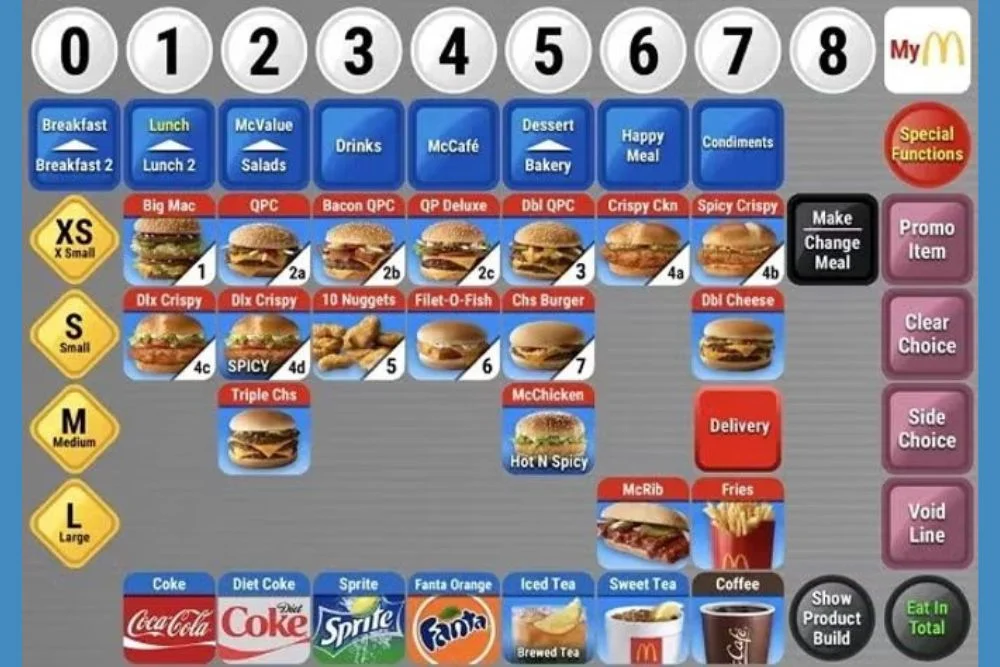
Order taking is the most important skill for any new McDonald’s crew member. Whether you’re preparing for your first day or practicing from home, learning how to take orders on the McDonald’s POS Training Simulator will help you build accuracy, confidence, and speed.
This guide explains how order taking works, how to swiftly explore the menu, how to handle adjustments, and the best approaches for understanding the actual McDonald’s cashier workflow.
If you’re completely new, you can start training on the main McDonald’s POS Training Simulator or install it from the POS Training Download page for APK, iOS, or online use.
Why Order Taking Matters in McDonald’s POS
Inside McDonald’s, more than 70% of cashier tasks involve:
- Picking the correct menu category
- Selecting the right item
- Asking follow-up questions
- Customizing an order
- Adding meals or upgrades
- Reviewing accuracy
- Completing a payment
The POS is designed for speed, so the faster you find the right things, the more smoothly the entire shift runs.
Practicing this procedure at home will give you a significant advantage on the job.
Understanding the McDonald’s POS Order Flow
Before practicing, you must understand the standard McDonald’s order flow used in real stores:
- Greet the customer
- Select the correct menu category
- Tap the requested item
- Choose meal or à la carte
- Apply customizations
- Suggest add-ons (optional)
- Review the order summary
- Take payment
- Complete the order
The McDonald’s POS Simulator follows this precise flow, making practice extremely realistic.
Step-By-Step: How to Practice Order Taking on the Simulator
Step 1: Identify the Menu Category Quickly
Speed begins with menu memorization.
When a customer says:
- “I’ll take a McChicken Meal” → Chicken
- “Large Caramel Frappe” → Drinks
- “Two Sausage McMuffins” → Breakfast
- “One Filet-O-Fish” → Fish / Burgers
The faster you detect categories, the faster you can take orders.
New learners should practice category identification for 10 minutes every day.
If you haven’t installed the simulator yet, you can download the McDonald’s POS Training Simulator here.
Step 2: Select the Correct Item
When you open a category, the items are displayed in button form.
Choose:
- Regular item
- Meal version
- Combo size
- Flavor or drink variation
Example:
Big Mac Meal → Big Mac → Meal → Drink size
Practicing these sequences helps you build muscle memory.
Step 3: Apply Customizations (The Most Common Errors)
Customization is where new learners make blunders.
The simulator lets you practice:
- Removing ingredients (no onion, no pickle)
- Adding extras (extra cheese, extra sauce)
- Changing drinks
- Changing sides
- Upgrading meal size
Example customer requests:
- “No pickles and no onions”
- “Large fries instead of medium”
- “Can you upgrade the drink to a Frappe?”
This is why using the online POS training version helps—it includes multiple customization screens.
Step 4: Practice with Combo Meals (50% of Real Orders)
Meal combinations account for half of all real consumer orders.
You must know how to:
- Convert a single item → Meal
- Change soda to coffee
- Change fries to hash browns
- Switch to a large combo
Practice these combos repeatedly:
- Big Mac Meal
- McChicken Meal
- 10-pc Nugget Meal
- Quarter Pounder Meal
Combos improve your tapping pattern and speed.
Step 5: Use Add-Ons to Build Real-Life Workflow
McDonald’s cashiers often ask:
- “Would you like fries with that?”
- “Any dessert today?”
- “Add a drink?”
The simulator allows:
- Desserts
- Add-on drinks
- Sides
- Sauces
Even though this is optional throughout training, it forces you to operate like a real employee.
Step 6: Review the Order Summary Before Payment
Always double-check:
- Item names
- Quantities
- Customizations
- Meal sizes
- Add-ons
- Prices
Many beginners skip this step and lose accuracy.
Accuracy matters more than speed during training.
Speed will come naturally later.
Step 7: Practice Payment Methods
The simulator includes:
- Cash (enter amount → calculate change)
- Card
- Mobile pay
- Exact amount
Start with Card, then increase difficulty by practicing Cash.
If you want deeper practice, check the POS Training Game Download page where payment scenarios are available.
Step 8: Repeat Orders Until Your Accuracy Is 95%+
Real McDonald’s stores rely on:
- Fast taps
- Minimal corrections
- Smooth transitions between screens
A good goal:
- Beginner: 80% accuracy
- Intermediate: 90% accuracy
- Pro level: 95%+ accuracy with speed under 20 seconds
Repeat the same sequence 10 times until muscle memory develops.
Pro Tips to Improve Order-Taking Speed
Tip 1: Familiarize Yourself With the Most Popular Items
Big Mac, McChicken, Double Cheeseburger, Fries, Coke, McFlurry.
Tip 2: Practice Same Screen Transitions
From menu → customization → summary → payment.
Tip 3: Use Quick Game Mode
It forces you to think quickly and improves real-shift reaction time.
Tip 4: Train on Both Mobile and Desktop
The layout changes slightly, helping you adapt.
Tip 5: Learn Customer Patterns
Most customers order:
- 1 burger
- 1 drink
- 1 fries
Mastering these patterns will make 80% of actual orders easier.
Why Practicing Order Taking Helps in Real McDonald’s Stores
Practicing order taking improves:
- Customer interaction flow
- Speed of menu navigation
- Understanding of combos
- Accuracy with customizations
- Comfort with payment screens
- Real-world shift performance
Your first day at McDonald’s will be considerably easier if this workflow feels intuitive.
For advanced speed training, see our upcoming guide on How to Improve Speed on the McDonald’s POS Training Game.
Conclusion
Order taking is the core of cashier training, and the McDonald’s POS Training Simulator is the greatest method to learn it without the pressure of a real shift. By practicing combos, modifications, menu navigation, and payment methods, you’ll quickly gain the accuracy and speed required for real-world retail operations.
You can continue your training by visiting the main McDonald’s POS Training page or installing the simulator from our download page for APK, iOS, or online play.
Continue to practice every day—the more repetitions you do, the faster and better you will become.