Speed is one of the most important skills for McDonald’s crew members. Whether you’re working the front desk or the drive-thru, learning the appropriate POS shortcuts will help you move through orders faster, eliminate hesitation, and enhance accuracy. These shortcuts are used every day by experienced cashiers to save time during rush periods and keep customer lines moving smoothly.
This guide explains the most important POS shortcuts, how they work, and how they help cashiers perform better on real shifts.
Why POS Shortcuts Are Important for Fast Service
Shortcuts enable cashiers to skip superfluous menu stages and go straight to the buttons they need. This is particularly useful during:
- Breakfast and lunch rush
- Drive-thru peak hours
- Large or complex orders
- Back-to-back customer flow
Cashiers who use shortcuts often finish orders several seconds faster, which adds up significantly when serving hundreds of customers a day.
Menu Navigation Shortcuts Every Cashier Should Know
Quick access to top-selling items
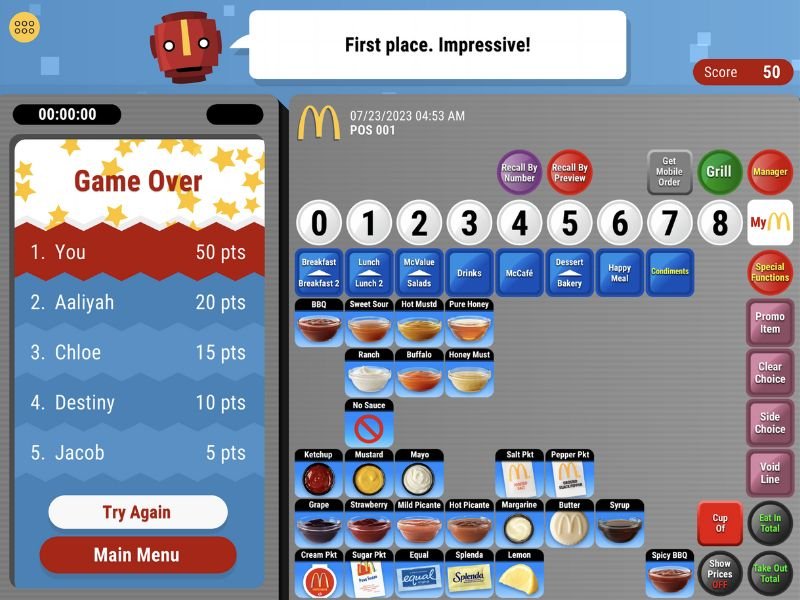
Most McDonald’s POS systems display high-frequency items on the first screen. This includes items like:
- Big Mac
- McChicken
- Quarter Pounder
- Fries
- Soft Drinks
Cashiers can choose them without searching if they know their exact position, which boosts confidence and speed.
Jumping between menu categories
POS systems let you switch categories instantly using tabs such as:
- Burgers
- Chicken
- Sides
- Drinks
- Breakfast
- Desserts
Spending less time scanning the screen is achieved by understanding the category arrangement.
Customization Shortcuts That Save Time
Accessing modification options
Customization buttons like “no pickles,” “no onions,” “extra cheese,” or “change drink” are available directly after item selection. Cashiers who memorize their positions can apply changes instantly.
Quick quantity changes
Instead of reselecting an item, you can increase or decrease quantities using the plus (+) or minus (–) buttons on the order summary panel.
Changing meal components
The POS has shortcuts for the following when clients ask for upgrades or replacements:
- Changing fry sizes
- Switching drinks
- Turning an item into a meal
- Removing a component
These shortcuts save a few seconds every order by avoiding the need to reopen the entire item screen.
Payment Shortcuts for Faster Checkout
Cash entry shortcuts
Instead of typing exact amounts, most POS systems include pre-set cash buttons such as:
- $5
- $10
- $20
This decreases computation errors and speeds up cash handling.
Exact change option
When customers pay with exact cash, the “Exact Amount” shortcut finalizes the order instantly.
Card and mobile pay button
One shortcut takes you directly to:
- Credit/Debit
- Mobile Payment
This avoids navigating through multiple confirmation steps.
Drive-Thru Shortcuts for High-Speed Orders
Quick switching between Order Points
Drive-thru systems make it possible to switch between orders with just one tap, which is crucial for handling:
- Multiple cars
- Split payments
- Add-on items
Speed keys for repeats
If a customer wants “the same as the previous order,” shortcuts allow the cashier to repeat items instantly.
Instant drink selection
Soft drinks often appear in a quick-access panel, allowing drive-thru cashiers to add them rapidly without navigating menus.
Meal Upgrade Shortcuts
Turning single items into meals
If a customer changes their mind and wants a meal instead of à la carte, the “Make It a Meal” shortcut converts the item immediately.
Changing meal size
Meal upgrades like “medium to large” can be done quickly through upgrade keys, reducing the need to re-enter the order.
How POS Shortcuts Improve Customer Experience
Faster order-taking
Customers appreciate quick service, especially during busy times.
Fewer mistakes
Shortcuts assist cashiers regularly select the right items by reducing searching and confusion.
Better communication
When a cashier understands the POS well, they can respond more confidently to questions or changes.
Improved team performance
Accurate and timely order entry improves workflow for the expeditor and kitchen.
How to Practice POS Shortcuts Effectively
Repeat common orders
Until you don’t have to search for every button, practice inputting common orders.
Focus on high-frequency items
Learning these first gives you the biggest speed boost.
Use simulation training daily
Simulators allow you to build muscle memory just like real POS training.
Build speed gradually
The most important thing is accuracy. As you are more at ease, speed automatically increases.
Conclusion
POS shortcuts are essential for any McDonald’s cashier who wants to work quickly, accurately, and confidently. By learning menu navigation shortcuts, customization tools, payment shortcuts, and drive-thru keys, new crew members can dramatically improve their performance during real shifts. With consistent practice, these shortcuts become second nature and help build strong customer service skills.