
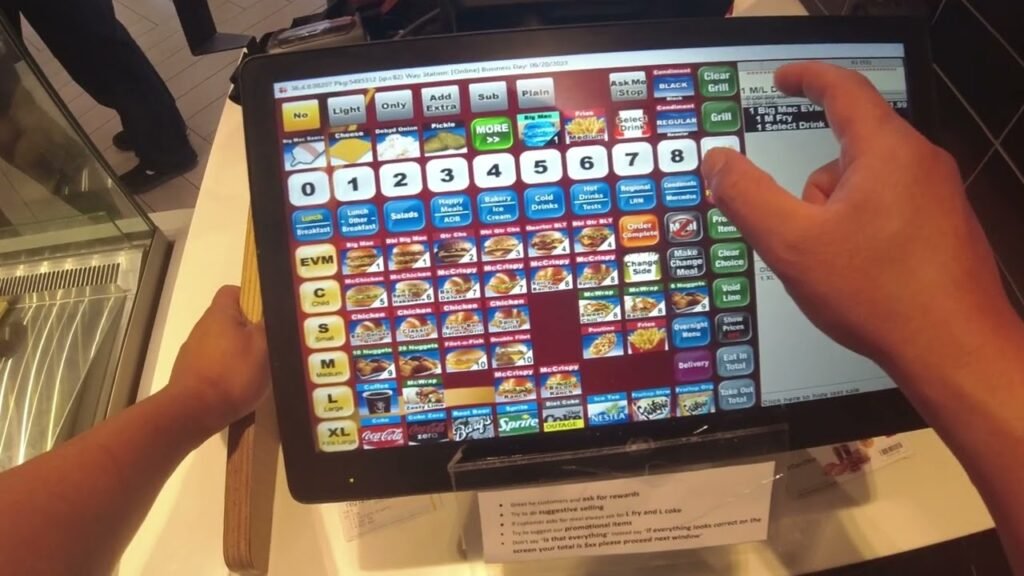
New McDonald’s cashiers are generally concerned during their first few shifts, and the majority of their issues derive from mastering the POS system. Understanding how to avoid common mistakes can dramatically improve speed, accuracy, and confidence. This guide highlights the most common faults that new crew members make and provides simple solutions to avoid them.
Mistake #1: Searching for Items Instead of Knowing the Layout
New cashiers often spend too much time scanning the screen for items. This slows the ordering process and adds demand during peak hours.
How to avoid it
Study the main menu categories, such as Burgers, Chicken, Drinks, Sides, Breakfast, and Desserts. Practice until you recognize where high-frequency items appear. With constant practice, you will be able to find items faster without having to look around the screen.
Mistake #2: Forgetting to Choose Meal vs. À La Carte
Many new cashiers accidentally select an item without choosing whether it should be a meal or à la carte, which leads to incorrect orders.
How to avoid it
Pause and confirm before tapping. Ask the customer clearly:
“Would you like that as a meal or just the sandwich?”
This prevents confusion and reduces corrections.
Mistake #3: Missing Customizations
Customers often request no pickles, no onions, extra cheese, change drink, or upgrade fries. Missing any customization leads to remakes and unhappy guests.
How to avoid it
After picking each item, pay close attention to the customizing screen. Apply all changes before proceeding to the next item. Slow down slightly here—accuracy is more important than speed.
Mistake #4: Choosing the Wrong Drink Size
Drink mistakes are common, especially during rush hours. Choosing the incorrect size creates delays and wastes product.
How to avoid it
Always confirm the drink size verbally and press the size button before proceeding. The POS screen displays drink sizes clearly—build the habit of verifying them.
Mistake #5: Entering Payment Incorrectly
New employees sometimes enter the wrong payment amount or choose the wrong payment method, leading to confusion or incorrect change.
How to avoid it
Double-check the quantity before entering it. Use preset cash buttons whenever possible to reduce errors. When making a card or mobile payment, be sure you press the correct button.
Mistake #6: Forgetting to Review the Entire Order
New cashiers often skip the final order review step. This leads to missing items, wrong items, or incorrect customizations.
How to avoid it
Make it a routine to glance at the full order before finalizing. The summary screen displays everything entered; use it to identify errors early.
Mistake #7: Adding Items Twice by Accident
Double taps or rushing through orders can cause duplicated items. Customers may get charged incorrectly, causing delays at checkout.
How to avoid it
Tap each button once and check the quantity in the order summary. If you see an accidental duplicate, adjust it using the plus or minus buttons.
Mistake #8: Not Handling Modifications Quickly
Customers sometimes change their minds in the middle of an order. New cashiers frequently erase the entire item rather than using editing shortcuts.
How to avoid it
Use modification options like size changes, drink changes, and ingredient adjustments. These allow you to update an item without deleting and re-entering it, saving time.
Mistake #9: Not Asking Clarifying Questions
Confusion happens when orders aren’t confirmed clearly. For example, “I want a cheeseburger meal” could mean a small, medium, or large.
How to avoid it
Ask short, simple questions such as:
- “What size meal would you like?”
- “Which drink would you prefer?”
Clear communication reduces errors and helps consumers feel supported.
Mistake #10: Feeling Rushed and Losing Accuracy
New employees frequently panic during hectic hours and make blunders by attempting to move too quickly.
How to avoid it
Remember that accuracy is more important than speed. Stay calm, follow the POS flow, and build pace naturally as you practice.
Conclusion
Mistakes are normal when learning the McDonald’s POS system, but with practice, new cashiers quickly gain confidence. Understanding these common errors—and knowing how to avoid them—helps improve accuracy, speed, and customer satisfaction. With consistent training, you’ll handle orders smoothly on both front counter and drive-thru shifts.