
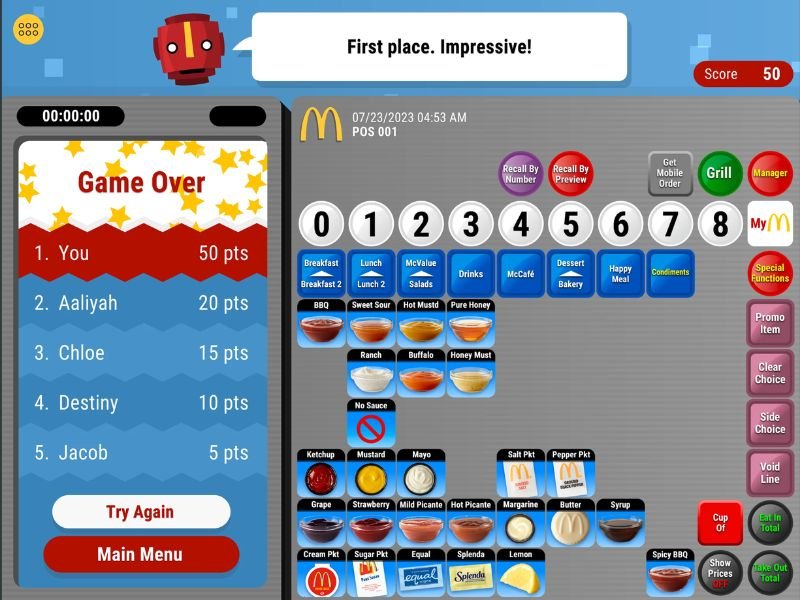
Drive-thru is one of the busiest and most demanding portions of any McDonald’s restaurant. It requires speed, accuracy, multitasking, and strong communication skills. Many new crew members feel overwhelmed when first learning how to take drive-thru orders, but with proper POS practice, the process becomes much easier. This guide covers how to practice drive-thru order-taking on the McDonald’s POS system, how to create efficient workflows, and how to prevent frequent problems.
Why Drive-Thru Training Is Different from Front Counter
Drive-thru training is unique in that it requires you to do multiple tasks at once. Unlike front counter, where you focus on one guest face-to-face, drive-thru requires:
- Listening to the customer
- Entering the order in real time
- Confirming details quickly
- Managing multiple cars in queue
- Processing payments rapidly
- Working with the kitchen and runner efficiently
This combination makes drive-thru one of the most important areas to practice on the POS system.
Understanding the Drive-Thru POS Layout
The order-taking screen
Drive-thru POS screens are designed to assist you take orders and listen to consumers. You will see:
- Order summary panel
- Menu category buttons
- Item selections
- Customization screen
- Payment shortcuts
Knowing where everything is located allows you to prevent pauses while consumers speak.
Order point switching
Drive-thru systems often have multiple order points, and each one needs to be managed smoothly. You can choose between Order Point 1, Order Point 2, and even different payment windows.
How to Practice Drive-Thru Order Taking Step-by-Step
Step 1: Practice listening while entering items
Drive-thru orders come quickly, so you must learn to:
- Listen and type at the same time
- Enter items in the order spoken
- Stay calm even when customers speak fast
Practicing this skill improves your multitasking confidence.
Step 2: Learn the most common drive-thru items
Drive-thru customers usually order items like:
- Burgers
- Chicken sandwiches
- Fries
- Coffee
- Soft drinks
- Breakfast combos
Practice selecting these items rapidly to reduce customer wait times.
Step 3: Apply customizations without slowing the conversation
Common requests include:
- No pickles
- No onions
- Add bacon
- Upgrade fries
- Change drink flavor
You must apply these changes while still listening to the customer’s next words.
Step 4: Confirm the order clearly and confidently
Drive-thru confirmation should be short and simple. For example:
“Your order is a Big Mac Meal with a large Coke, a McChicken, and a small fry, correct?”
Clear confirmation reduces errors and improves the client experience.
Step 5: Practice payment handling
Drive-thru POS payment modules allow quick:
- Cash
- Card
- Mobile pay
- Exact amount
Practicing these allows you to handle payments at the window faster.
Essential Drive-Thru POS Shortcuts to Practice
Repeat last item
Useful when customers say, “Make that two.”
Modify item
Instead of removing the item, use the modification options to make changes.
Quick drink buttons
Drinks are frequently ordered, so memorize the drink quick keys.
Quick cash buttons
Preset amounts help finalize cash payments faster.
How to Improve Multitasking Skills for Drive-Thru
Practice with background noise
Drive-thru speakers can make it difficult to hear. Practicing with low noise levels helps simulate real-world settings.
Learn to stay focused under pressure
During rush hours, cars move quickly. Staying calm helps you avoid mistakes.
Keep your eyes and ears working together
Look at the POS while listening to the customer, not after they’ve finished speaking.
Train on order patterns
Customers frequently order in predictable patterns. Recognizing them helps you anticipate what will happen next.
Common Mistakes in Drive-Thru POS Use (and How to Avoid Them)
Entering items too slowly
This causes delays. Learn menu positions and shortcuts to speed up.
Missing customization requests
You must listen carefully and apply each change immediately.
Switching order points incorrectly
Before entering an item, always make sure that the correct order point is active.
Incorrect payment entry
Double-check payment type to prevent delays at the window.
How Practicing the POS Helps Drive-Thru Confidence
Drive-thru becomes more convenient when the POS system feels natural. Practicing regularly helps you:
- Respond quickly
- Navigate menus smoothly
- Avoid confusion
- Communicate confidently
- Reduce stress
With enough practice, the drive-thru can become one of the most pleasurable jobs in the store.
Conclusion
Drive-thru order-taking requires a combination of strong POS skills, fast communication, and the ability to multitask under pressure. By practicing the POS layout, learning shortcuts, improving listening skills, and understanding common customer patterns, new crew members can dramatically improve their drive-thru performance. With consistent practice, speed and accuracy will become second nature.